
RGB Model
- RGB / RGBA Notation
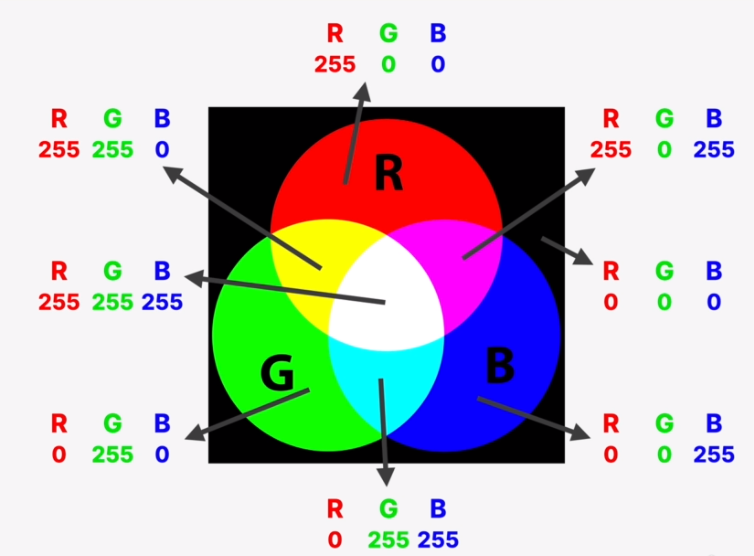
- Every color can be represented by a combination of RED, GREEN, and BLUE.
- Each of the 3 base colors can take a value between 0 and 255, which can make 16.8 million different colors.
- Regular RGB model:
- Pure red color would be rgb(255, 0, 0); or 255 maximum red, with 0 green, and 0 blue.
- Pure white would be rgb(255, 255, 255); or 255 maximum in all three colors.
- Black would be rgb(0, 0, 0); or 0 in all three colors.
- RGBA with transparency (“alpha”)
- rgba(244, 179, 63, 0.7); would be a transparent (you can see other colors or text behind it) light orange color.
- Hexadecimal Notation
- Hexadecimal is used more often in CSS than the RGB notation.
- It uses a scale from 0 to ff (which is 255 in hexadecimal numbers)
| HTML Name | RGB Hex | RGB Shorthand | RGB Decimal |
|---|---|---|---|
| White | #ff ff ff | #fff | 255, 255, 255 |
| Silver | #c0 c0 c0 | 192, 192, 192 | |
| Gray | #80 80 80 | 128, 128, 128 | |
| #44 44 44 | #444 | 68, 68, 68 | |
| Black | #00 00 00 | #000 | 0, 0, 0 |
| Red | #ff 00 00 | #f00 | 255, 0, 0 |
| Yellow | #ff ff 00 | #ff0 | 255, 255, 0 |
| Brown | #a5 2a 2a | 165, 42, 42 | |
| Green | #00 80 00 | 0, 128, 0 | |
| Aqua | #00 ff ff | #0ff | 0, 255, 255 |
| Blue | #00 00 ff | #00f | 0, 0, 255 |
| Fuchsia | #ff 00 ff | #f0f | 255, 0, 255 |
Interesting facts:
- When all three channels are the same, we get a gray color. In fact there are 256 pure grays to choose from.
- Shorthand hex notation substitutes 3-character color values for 6-character colors when each of the color channels is identical in a RRGGBB hex triplet.
- If you write two different colors, (font-size, font-family,etc. for example) in two or more different selectors (i.e. h1, h2, p, li, etc.) the bottom selector overwrites the selectors above it in the CSS styles page.
Background-color property sets the background color of an element (heading, body, p, div, aside), including padding and border (but not the margin).
Border property allows you to specify the width, style, and color of an element’s border, in one declaration.
border: 5px solid #1098ad;
border-bottom: none;
Other options:
Line width: thick, medium, thin, or pixels
Line style: solid, dotted, dashed, double, or ridge or groove(two color toned)
Line color: multiple colors in RGB, RGBA, HSL, hexadecimal, and currentColor (same color of the element it is listed with. I.e., if you want the border to be the same color as the text color.)